获取app uuid
登录Cloudflare控制面板后,有一串字符,就是你的账户标识符(Account ID)。

dash.cloudflare.com/[账户标识符(Account ID)]
如果你是通过Pages项目开启的Preview access,可以执行以下步骤获取app uuid:
前往Compute → Workers & Pages
找到意外开启 Preview access 的Pages项目,前往Settings → Preview Access → Manage
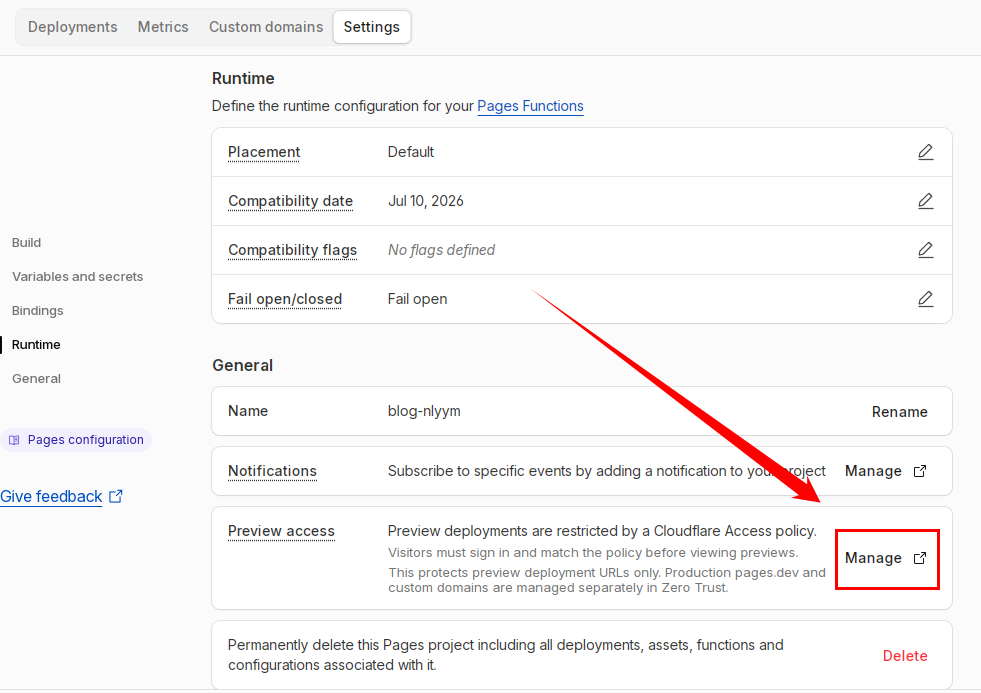
如果这里显示的是Restrict Previews,则说明这个Pages项目没有开启Cloudflare Access。
进入Manage后,有2串字符。如图,第1串字符是账户标识符(Account ID),第2串字符是app uuid

如果你是通过其他方式开启的Access Policy,可以通过以下方法查询app uuid。
打开Cloudflare控制面板,保持本页面。 Windows 按 F12 或 Ctrl + Shift + J, Mac 按 Command + Option + J。你也可以在网页任意空白处点击鼠标右键,选择“检查”,然后切换到“控制台”标签页。
在控制台页面执行以下代码,注意替换YOUR_ACCOUNT_ID。
首次使用浏览器控制台需要按提示确认启用
 1
 2
 3
 4
 5
 6
 7
 8
 9
10
11
12
13
14
15
16
17
18
19
20
21
22
23
24
25
26
27
|
const accountId = 'YOUR_ACCOUNT_ID';

async function getAccessApp() { const url = `https://dash.cloudflare.com/api/v4/accounts/${accountId}/access/apps/`;

  try {
    const response = await fetch(url, {
      method: 'GET',
      headers: {
        'Content-Type': 'application/json',
        'x-cross-site-security': 'dash'
      },
      credentials: "include"
    });

    if (!response.ok) {
      throw new Error(`HTTP error! status: ${response.status}`);
    }

    const data = await response.json();
    console.log('请求成功:', data);
    return data;
  } catch (error) {
    console.error('请求失败:', error);
  }
}

getAccessApp();
|
控制台输出请求成功后,打开 Network 标签页。在产生的流量中,定位名为 apps/ 的 GET 请求。
选中该请求,从 Preview 或 Response 中result找到对应Access Policy的id,即为下文要使用的app uuid。
关闭Access Policy
方法一:通过浏览器控制台关闭Access Policy
此方法使用 Dashboard 内部 API 端点,依赖浏览器 session cookie 认证,不需要 API Token
打开Cloudflare控制面板,保持本页面。 Windows 按 F12 或 Ctrl + Shift + J, Mac 按 Command + Option + J。你也可以在网页任意空白处点击鼠标右键,选择“检查”,然后切换到“控制台”标签页。
在控制台页面执行以下代码,注意替换YOUR_ACCOUNT_ID和YOUR_APP_UUID。
首次使用浏览器控制台需要根据提示确认启用
 1
 2
 3
 4
 5
 6
 7
 8
 9
10
11
12
13
14
15
16
17
18
19
20
21
22
23
24
25
26
27
28
29
|
const accountId = 'YOUR_ACCOUNT_ID';
const appUuid = 'YOUR_APP_UUID';

async function deleteAccessApp() {
  const url = `https://dash.cloudflare.com/api/v4/accounts/${accountId}/access/apps/${appUuid}`;

  try {
    const response = await fetch(url, {
      method: 'DELETE',
      headers: {
        'Content-Type': 'application/json',
        'x-cross-site-security': 'dash'
      },
      credentials: "include"
    });

    if (!response.ok) {
      throw new Error(`HTTP error! status: ${response.status}`);
    }

    const data = await response.json();
    console.log('删除成功:', data);
    return data;
  } catch (error) {
    console.error('请求失败:', error);
  }
}

deleteAccessApp();
|
若控制台返回删除成功,则说明该Access Policy关闭成功。
方法二:通过curl关闭Access Policy
此方法使用 Cloudflare 官方提供的 API 端点,需要Global API Key。
打开这个页面,找到 Global API Key,修改或查看并复制下来。
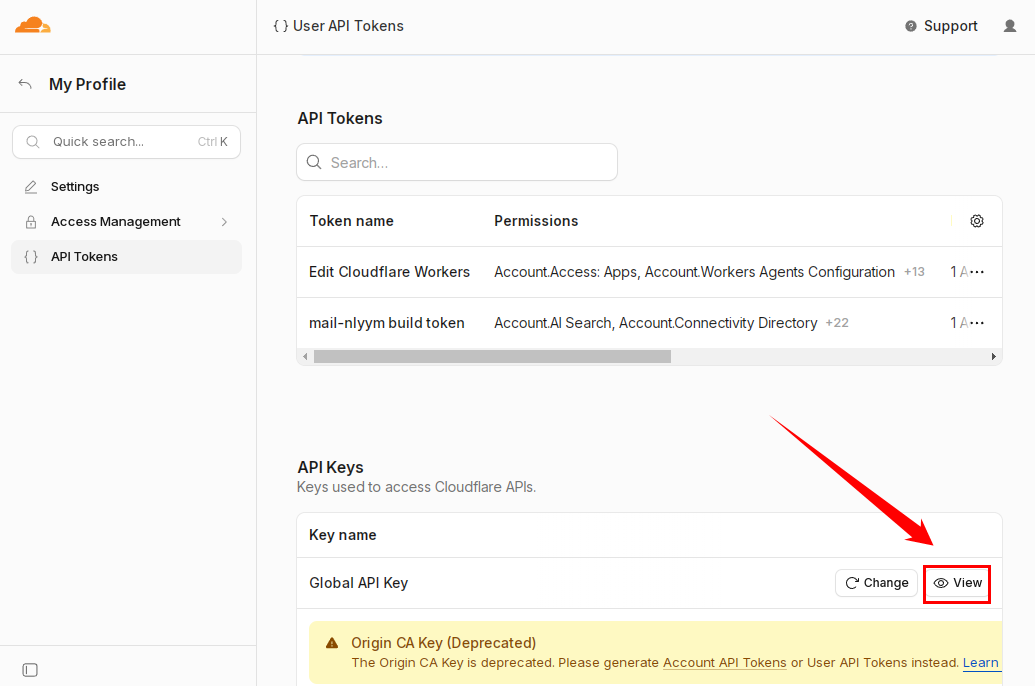
Global API Key以cfk_开头。如果你的账号在2026年4月之前使用过Global API Key且未更换,可能没有cfk_前缀。
之后,我们使用curl命令发送DELETE请求关闭特定的Access Policy(注意修改一些值)。
Windows:
1
|
curl -X DELETE "https://api.cloudflare.com/client/v4/accounts/[账户标识符(Account ID)]/access/apps/[app uuid]" -H "X-Auth-Email: [账户邮箱]" -H "X-Auth-Key: [Global API Key]" -H "Content-Type: application/json"
|
Linux:
1
2
3
4
|
curl -X DELETE "https://api.cloudflare.com/client/v4/accounts/[账户标识符(Account ID)]/access/apps/[app uuid]" \
-H "X-Auth-Email: [账户邮箱]" \
-H "X-Auth-Key: [Global API Key]" \
-H "Content-Type: application/json"
|
注意替换[账户标识符(Account ID)]、[app uuid]、[账户邮箱]和[Global API Key]
如果输出与以下内容类似,则说明该Access Policy关闭成功。
1
2
3
4
5
6
7
8
|
{
"result": {
"id": "[app uuid]"
},
"success": true,
"errors": [],
"messages": []
}
|